How to Choose the Lag Length and the Shrinkage for Forecasting
Guide 4 of 4 in the series Forecasting with a VAR
Based on Bayesian Macroeconometrics (Chan, forthcoming)
[ Full guide on GitHub ]
Forecasting with a BVAR requires two settings: the lag length p and the shrinkage hyperparameter c1 of the natural conjugate prior. The marginal likelihood is the product of the one-quarter-ahead predictive densities of the observations (Geweke, 2001). Maximizing it over the two settings therefore selects the specification that would have forecast best within the sample (Giannone, Lenza and Primiceri, 2015).
In this guide we choose the two settings in this way at each forecast origin of How to Evaluate Forecasts Out of Sample, and we score the forecasts one quarter ahead. We compare them with 24 alternatives. Each has a fixed lag length between one and eight, and a value of c1 that is either chosen by the marginal likelihood at each origin or set to the commonly used 0.22 or to 10. The value 10 gives a nearly flat prior, under which the posterior means are close to the least squares estimates. We make the comparison twice, once with all the data up to each origin and once with only its last 80 quarters.
The forecasts made with the settings that maximize the marginal likelihood score almost as well as the best of the alternatives. With c1 chosen by the marginal likelihood, lags beyond the fourth change the scores little. With c1 = 10, these lags lower the scores, most of all with 80 quarters.
The steps
- Choose the Lag Length and the Shrinkage at Each Origin
- Forecast One Quarter Ahead
- Compare the Choices
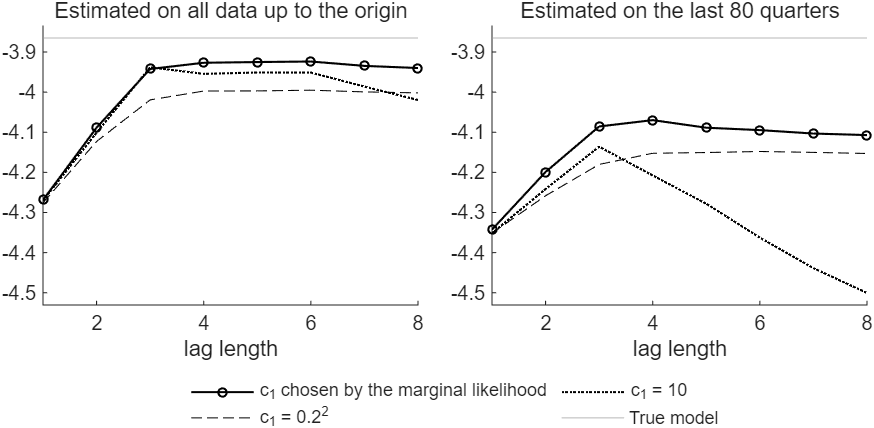
Figure 1: The average joint log score of the one-quarter-ahead forecasts against the lag length, for the three choices of c1, with the BVAR estimated on all the data up to each origin (left) and on the last 80 quarters (right). The gray line is the score of the true model.
Try it
In MATLAB, from the root of a copy of bvar-toolkit, run the script that prints every number and draws every figure of the guide:
run guides/var_lag_shrinkage/guide.m
In this series
Previous: How to Evaluate Forecasts Out of Sample