How to Simulate Data from an Estimated VAR
Guide 1 of 4 in the series Forecasting with a VAR
Based on Bayesian Macroeconometrics (Chan, forthcoming)
[ Full guide on GitHub ]
The guides of this series show how to set up a VAR for forecasting, using simulated data. Simulated data come from a known model, so every forecast can be compared with the forecast made with the true parameters. In this guide we build the true model of the series, a VAR(4) fitted by least squares to US real GDP growth, PCE inflation and the unemployment rate from 1960 to 2019. We check that it is stable, compute its stationary distribution, simulate a sample with bvar.util.simulate_var, and compare it with the data.
The steps
- Fit the VAR
- Check Stability and Compute the Stationary Distribution
- Simulate a Sample
- Measure the Variation across Samples
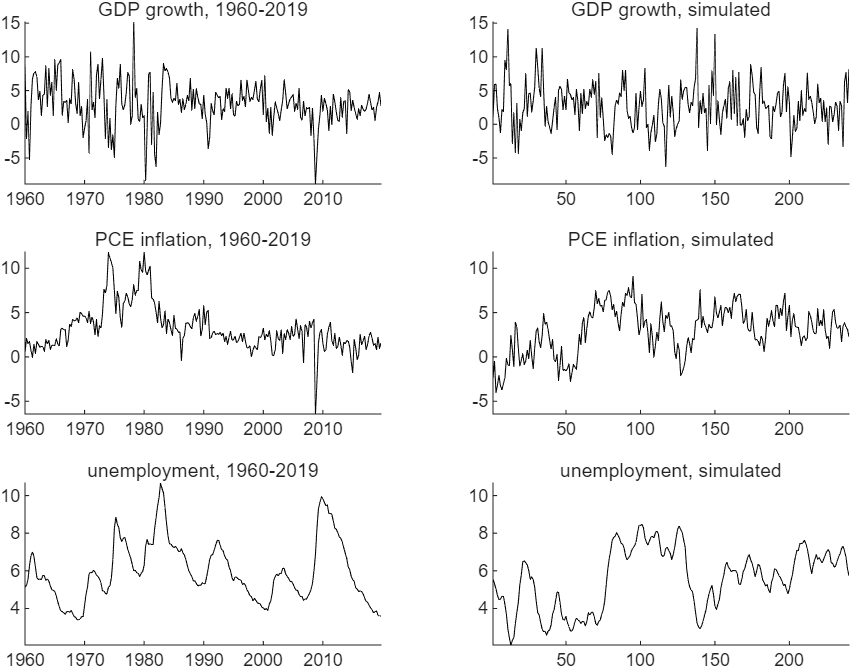
Figure 1: Left, US real GDP growth, PCE inflation and the unemployment rate from 1960Q1 to 2019Q4, against the year. Right, a sample of 240 quarters simulated from the VAR(4) fitted to these data, against the quarter. The two panels of each row share one vertical scale.
Try it
In MATLAB, from the root of a copy of bvar-toolkit, run the script that prints every number and draws every figure of the guide:
run guides/var_simulation/guide.m
In this series
Next: How to Forecast with a Bayesian VAR